Electronic Arts Website - Usability Testing
UX/UI Study + Redesign | Desktop | Feb - Mar 2021 (Unsolicited)
UX Strategy | Usability Testing Methodologies | Heuristic Evalutation | System Usability Scale | Prototyping
Problem Statement
How do we improve the findability of information for the users of EA.com website?
Context
EA – Electronic Arts Inc., an American video game company, is a global leader in digital interactive entertainment. EA develops and publishes games, content and online services for Internet-connected consoles, mobile devices and personal computers.
The motive behind this project was to do a Usability Testing Report for an identified website (www.ea.com) & to demonstrate the understanding and application of UX Strategy skills on Usability Testing Methodologies learnt during the UX Strategy 1 course from BCIT – UI & UX Design Certificate program.
The core skills to demonstrate were
(a.) To empathize with the user & identify the user’s frustrations with finding information on the website by understanding the Target Audience, creating Persona.
(b.) To gather specific feedback from users for the identified tasks that pose usability issues by employing multiple testing strategies.
(c.) To measure website functionality by analyzing the feedback and recommend solutions that will fix the usability issues and thereby improve the user experience of the website with the help of Paper-prototyping/Low-fi wireframe & Hi-fi Mock ups using Adobe Illustrator.
Project Details
Original Site
www.ea.com
Software
Google Forms, Zoom, Adobe Illustrator, Excel, Usabilityhub.com, Canva.com
Type
Group Project: Team of 3 UX Designers
Role
Sowmya Malur Bhima Kumar – UX + UI Designer, Test Moderator & Observer
Assumption
Participants recruited were the ideal users of the website and that there were no Budget & time constraints to implement the solution.
Process
The below stages of Design Thinking Process was applied to the project. Design Thinking is a non-linear iterative process, I have described below my findings during one such iteration.
Understand-Bookmark
1. Understand
Initial Audit
On the web, usability is critical for survival. If the users find the
user interface difficult to use, they leave. With that in mind, our first step was in defining the goals for the usability testing report and do an initial audit of the website to uncover areas of usability issues. We mainly focused on how easy it is to navigate the website and if the users can find the relevant information efficiently. For this study, we focused on the desktop version of the site.
During this initial evaluation, we identified that the website had many usability issues and noted down some of them as below.
Below are some of our key findings :
- Confusing global navigation with some repeated menu items
- Missing product catalogue page
- Missing search functionality,
- Missing information on how to Contact and so on

Empathize-Bookmark
2. Empathize
Audience Analysis
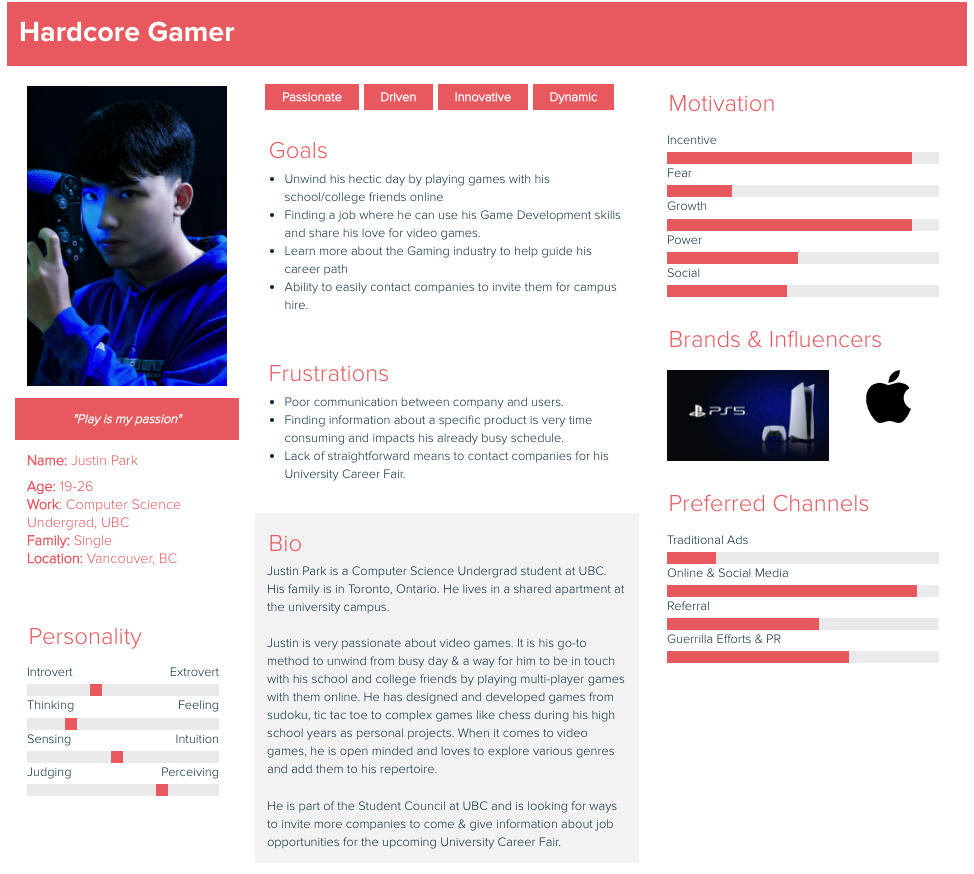
We curated a list of ideal user types and determining the primary and secondary audiences for the website based on demography, behaviour and motivations. User types will help with understanding the user’s needs and their frustrations in using the website.
- Youth
- Gamer
- Sports Fan
- Parent
- You Tuber
- Job applicant
- Other Organization/Corporations
Persona Building
Based on the audience analysis, I developed a persona to determine what an ideal user for EA would look like.
Test-Bookmark
3. Test
Usability Testing
In order to discover the frustrations of the user in using the EA.com website, our team and I recruited 5 participants for our usability testing. The age range of the participants was between 18 and 44 years old, which are closely based on the ideal user type for the website. Majority of them played video games every week & every participant purchased games online.
Our testing process was as follows:
- Pre-Test Questionnaire
- Usability Hub Tests
- First Click Test
- Preference Test
- Think-Aloud Tasks
- Post-Test Questionnaire
Usability Test Methodology
Website Tasks
Below are the 5 tasks we asked our users to complete during testing.
Task #1: Contact EA Personnel to enquire about Career Fair.
Task #2: Get the trial version of a “dragons” game.
Task #3: Learn about Membership.
Task #4: Contact EA to enquire about outstanding refund status.
Task #5: Find a multi-player game other than sports/shooting genre, that can be played on Mac and is under $50.
Environment
All user tests were conducted via Zoom meetings remotely due to COVID 19 restriction.
After users completed each test, we used System Usability Scale (SUS) test, a standardized set of questions that will help determine the users’ satisfaction with the website, to ask them on a scale of 1 to 10 (1 being easy 10 being difficult) how cumbersome the task was to complete.
The System Usability Scale is not diagnostic and will not tell what
specific problems are, but it will give a rating to know how critical the usability needs work.
Roles
Due to time constraints & scheduling conflicts, we each took upon the role of Moderator, Observer & Organizer of the testing for each of the participant that we undertook. I was responsible for user testing with 2 participants.
Usability Test Results Analysis
Heuristic Evaluation
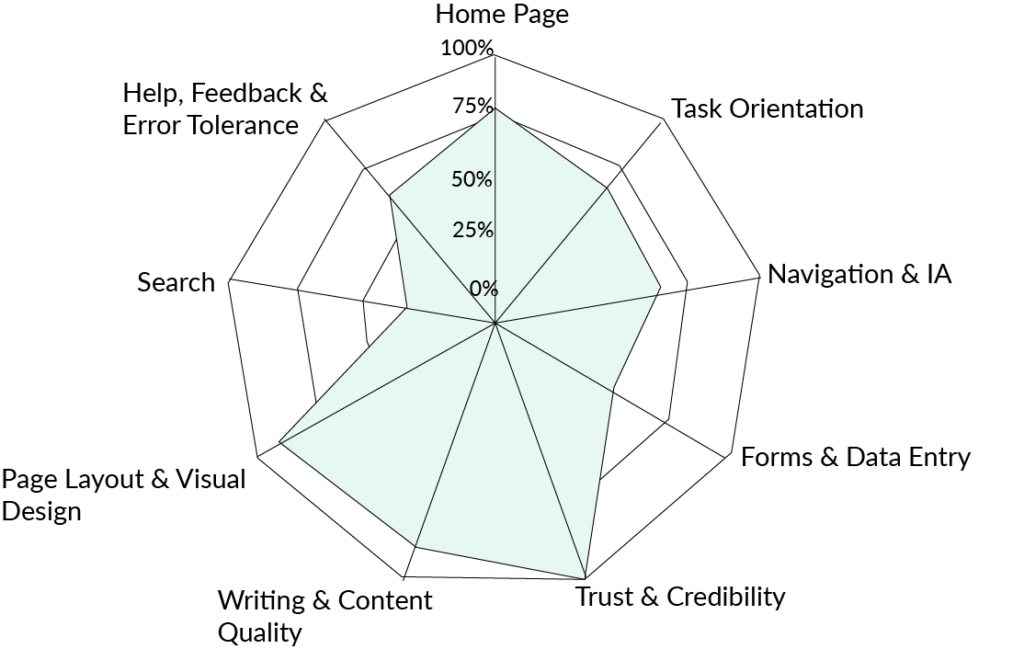
Our team did a heuristic analysis of the website based on the 9 predetermined guidelines which gave us insight into the ‘obvious’ errors of the usability of the website before conducting user-testing.
From these results, we can conclude that Trust and Credibility, Page Layout and Design scored the highest while the Search scored the least. We can now compare these results with the tests our participants take to determine if they found issues in the same areas.
| Raw Score | # Questions | #Answers | Score | |
|---|---|---|---|---|
| Home Page | 12 | 20 | 20 | 80% |
| Task Orientation | 15 | 44 | 44 | 67% |
| Navigation & IA | 8 | 29 | 29 | 64% |
| Forms & Data Entry | 0 | 23 | 23 | 50% |
| Trust & Credibility | 13 | 13 | 13 | 100% |
| Writing & Content Quality | 17 | 23 | 22 | 89% |
| Page Layout & Visual Design | 22 | 39 | 27 | 91% |
| Search | -7 | 20 | 20 | 33% |
| Overall Score | 248 | 238 | 70% |
First Click Test Results
With the use of first click test on the Usability Hub, we wanted to see where the users are naturally inclined to click when looking for certain information on the website. Since there were many ways to subscribe for EA membership, we asked the participants to choose where they would click to find more information about subscription and the reasoning behind their choice. The results from this task would be used to avoid ambiguity and improve the navigation of the website.
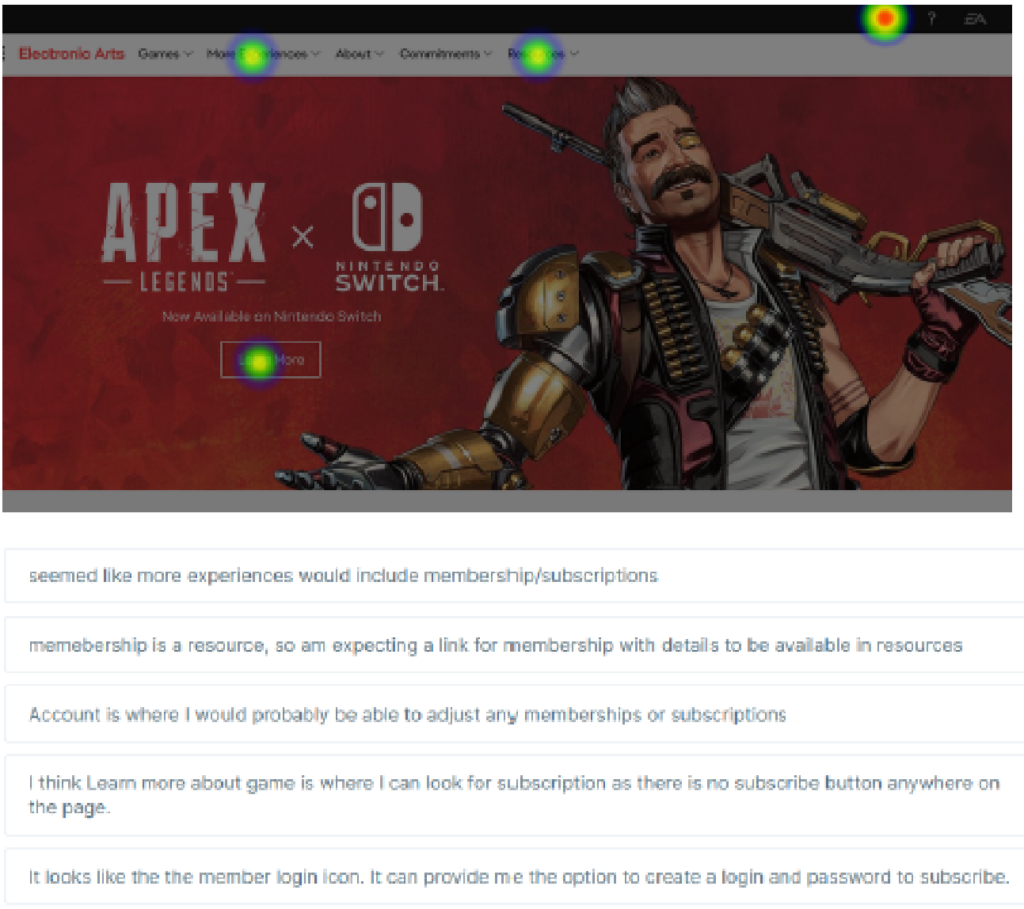
From the Heat Map, we can see that each participant chose a different area to click for membership subscription and only one participant got it wrong (clicked on "Resources”). This gave us insight into which area users are more inclined to click and why. But interestingly, all participants went to Games >> Subscribe for the think aloud tasks.
Preference Test Results
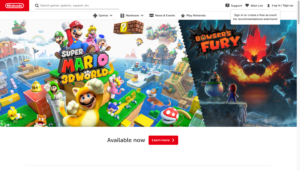
Using UsabilityHub.com, we did the Preference Test to get a general sense of the first impressions of the landing page’s design and usability. In this test, users were given 4 images of the landing pages of gaming websites (EA, Activision, Nintendo & Ubisoft) and were asked: “Which design do you prefer and why?”
2 / 5 participants preferred EA.com design for the “Featured Games” section.

2 / 5 participants preferred Activision website design as it looked more "Modern" & the hero image gave "a jist into what the game might be about"
1 / 5 participant preferred Nintendo for "the artwork of Original Mario adapts well to 2021"
Think Aloud Tasks Results
Severity Scale Results:
We observed how the participants reacted to the tasks given to them by thinking aloud so we can hear their thought process and determine what fixes and changes could be made to website design in order to create a better user experience.
- Task 2 has the highest severity as the participants could not find a “dragon” game as there were no search/filter option.
- Task 5 has the next highest severity. Even though some participants rated lower scales on the SUS question, none of them were able to complete the task.
The results confirmed that users struggled to complete Task 2 and Task 5. We will improve this functionality by redesigning the website.
| Task | Task Description | Impact | SUS Question | P1 | P2 | P3 | P4 | P5 | SUS Avg. | SUS % | Severity (0=Good, 5 = Bad) |
|---|---|---|---|---|---|---|---|---|---|---|---|
| 1. | Contact EA Personnel to enquire about Career Fair | 2 | Was this task easy to do? | 10 | 10 | 2 | 9 | 7 | 7.6 | 76% | 1.52 |
| 2. | Find the trial version of "Dragons" game | 5 | Was this task complex to complete? | 6 | 5 | 10 | 9 | 6 | 7.2 | 72% | 3.6 |
| 3. | Learn about Membership | 5 | How straightforward was it to find this information? | 5 | 1 | 1 | 1 | 1 | 1.8 | 18% | 0.9 |
| 4. | Contact EA to enquire about outstanding refund status | 4 | How simple was it to find the answers you were looking for? | 3 | 3 | 8 | 7 | 2 | 4.6 | 46% | 1.84 |
| 5. | Find a multi-player game other than sports/shooting genre, that can be played on Mac and is under $50. | 4 | Was this task cumbersome to do? | 2 | 10 | 9 | 2 | 6 | 5.6 | 58% | 2.32 |
Completion Rate:
We decided to perform a quick analysis on the time it took for all participants to complete each task and if they were able to complete them or not. This would provide insight into which area in the current site needs addressing.
| Task | Task Description | Completion Status | Time to Complete (Avg) |
|---|---|---|---|
| Task #1 | Contact EA personnel to inquire about Career Fair | No Participant Completed | 2 minutes 40 seconds |
| Task #2 | Find the trial version for "Dragons" game | No Participant Completed | 3 minutes 30 seconds |
| Task #3 | Learn more about membership | All Participants Completed | 1 minute |
| Task #4 | Contact EA to inquire about outstanding refund status | 3 Participants Completed 2 Participants did not complete |
3 minutes 8 seconds |
| Task #5 | Find a multi-player game other than sports/shooting genre, that can be played on Mac and is under $50. | 1 Participant Completed 4 Participants did not complete |
3 minutes 4 seconds |
Based on the information above, we can see finding membership information was the easiest task to complete, whereas finding contact information and trial/demo versions of games was the most difficult since participants eventually gave up on trying to complete these tasks. It is also important to note that finding a game with multiple criteria was also difficult for participants to complete as there is no filtering option in the current site.
Key Takeaways
- All 5 participants expected a “Contact Us” link with a phone number or email id and a search bar &/or filter to find games quickly based on a criteria.
- 3 / 5 participants gave up on the task when they could not find relevant games for the “mac” platform.
- 4 / 5 participants were unable to find games related to dragons to get the trial version.
- All 5 participants were frustrated to browse page-by-page to find a game, some even mentioned that they would not return to the website which is a red flag.
- Majority of the participants were able to complete only 2 out of 5 tasks.
- Participants were often confused where they were on the site and found it difficult to navigate, sometimes using the back button of the browser.
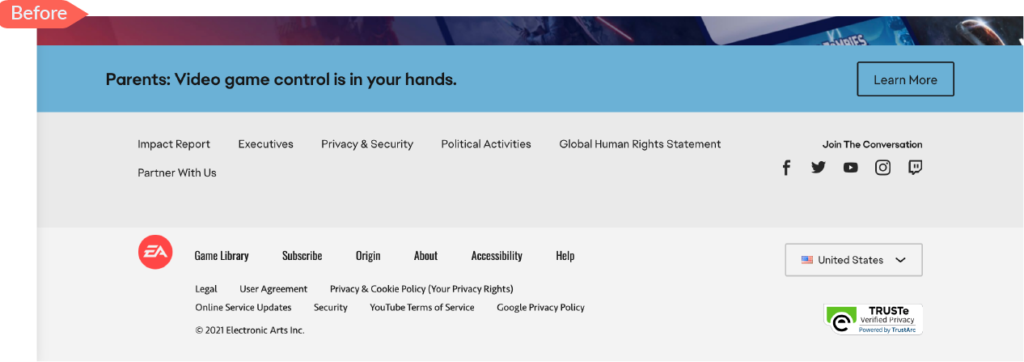
- Inconsistent Footer links and global navigation menus. Visual cues were missing to indicate that some links would launch a different website.
- Trouble getting to the home page of ea.com. The placement of the EA logo on the right corner of the page went unnoticed.
Ideate-Bookmark
4. Ideate
After consolidating and understanding the main pain points from testing, we came up with the below recommended actionable items.
Issue #1 : Lack of Search bar
All the participants were attempting to find a search bar/ search function on the website and gave the feedback that it would have helped immensely when looking for specific information on the website. Participants had difficulty especially when doing the tasks that required to find games.
Solution:
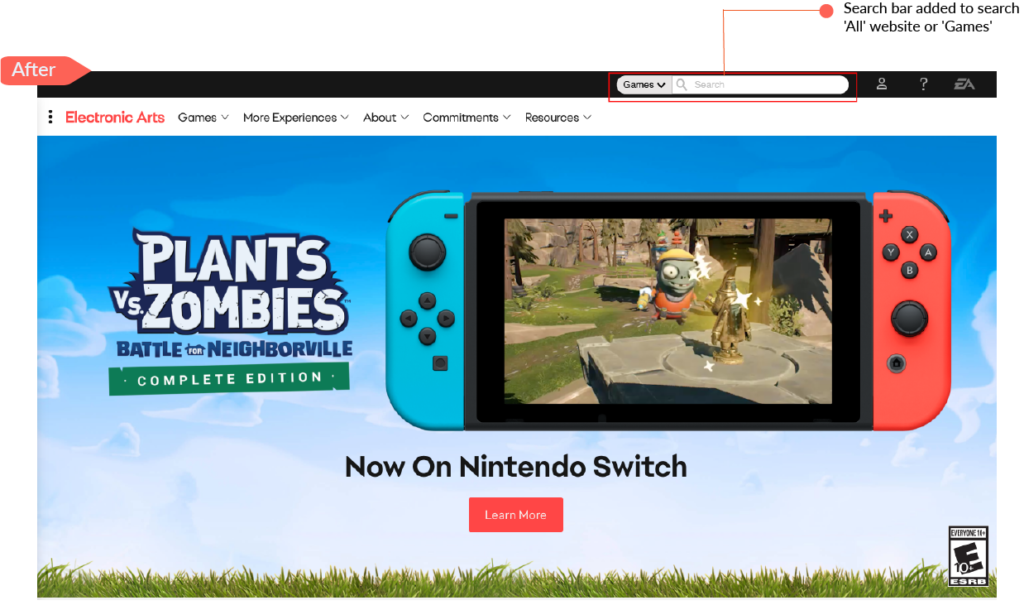
Provide Search bar where the users can search for general content on the entire website or search for specific Games.
Issue #2 : Lack of Option to Filter Games
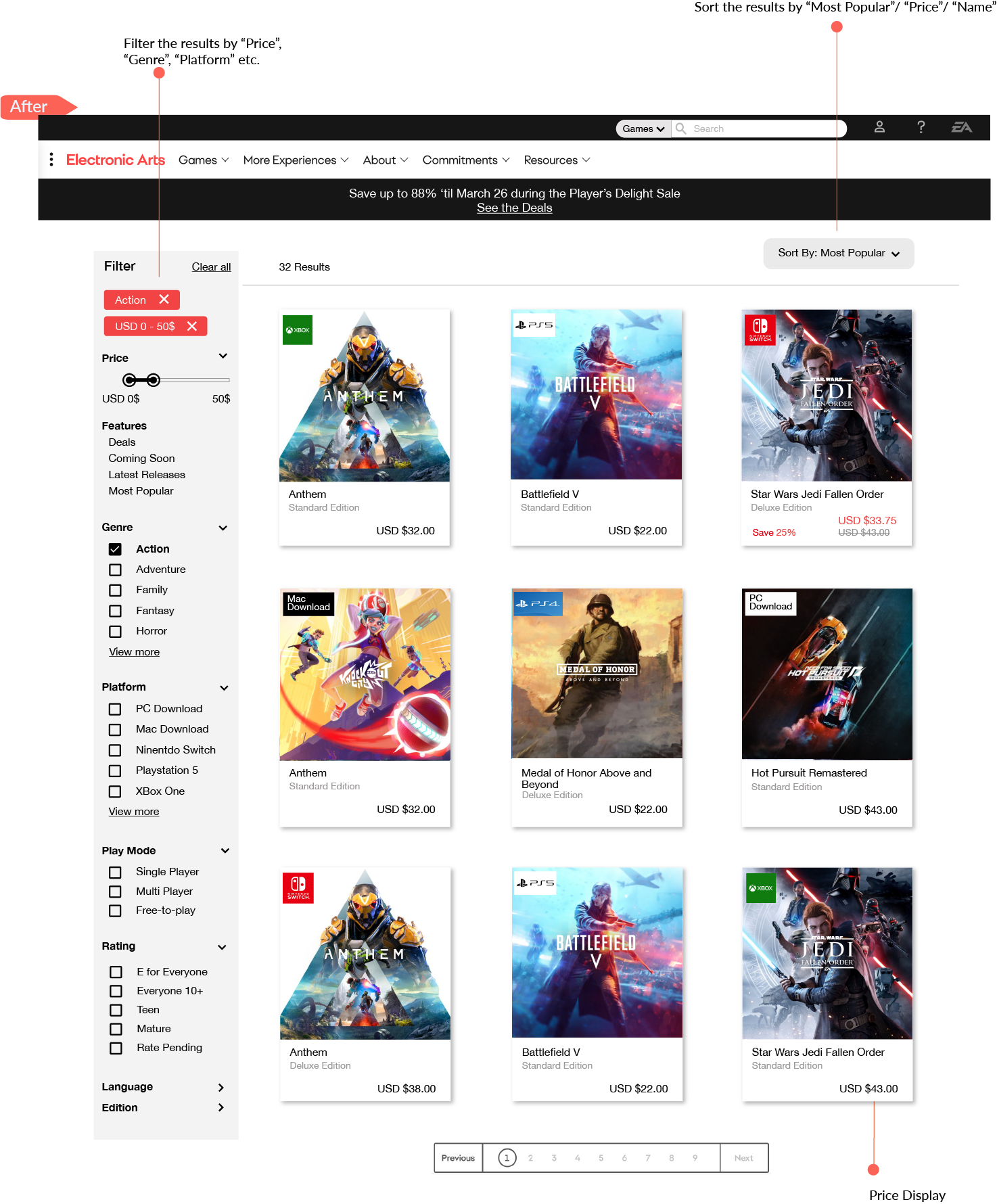
All participants found it extremely frustrating to browse page-by-page to find a game and indicated that a way to filter the games based on multiple criteria ex: genre, price, platform etc. would be tremendously helpful.
Solution:
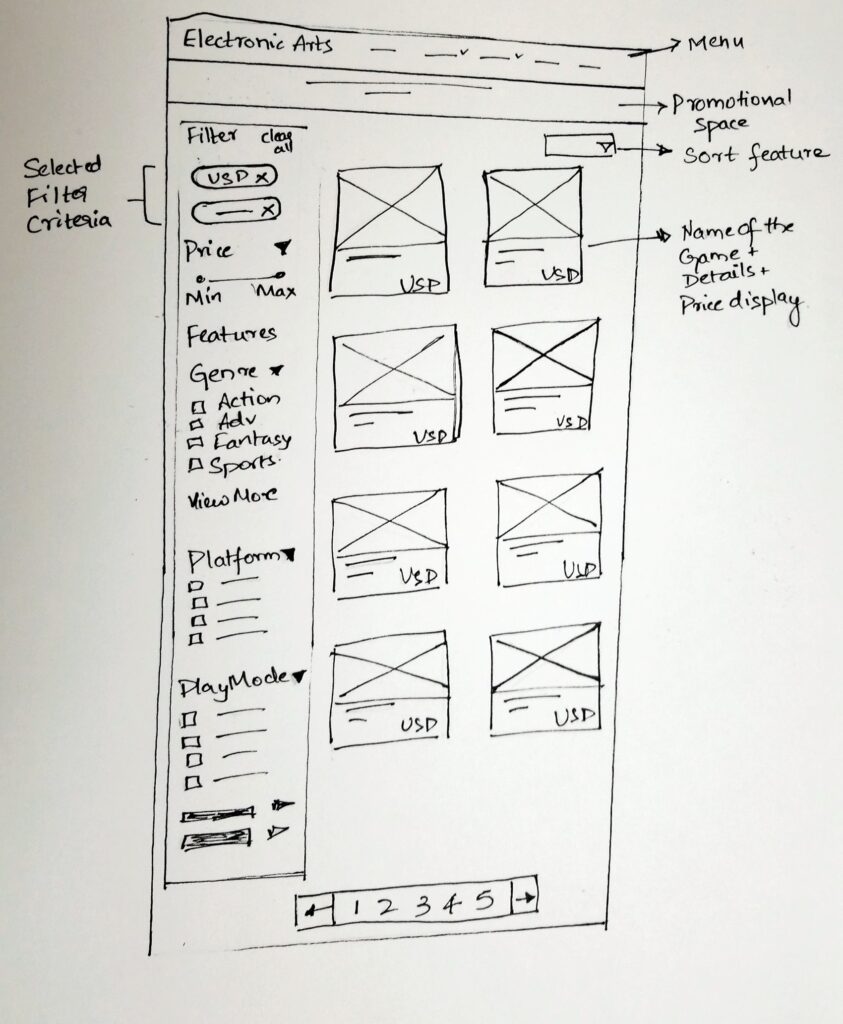
By providing an option to filter the games based on multiple facets like price, genre, platform, play mode, featured options like deals, etc. along with the ability to search for a game by name would drastically improve the user experience. In addition, the users can sort the results by 'Most Popular', 'Price: High to low', 'Price: Low to High', 'Name: A-Z' and 'Name: Z-A'
Issue #3 : Lack of Contact Us link/page
All participants was attempting to find 'Contact Us' link on EA.com with phone number or email id information to contact EA personnel for Task 2 (enquire about Career Fair) . Although there is 'Contact us' on 'Help' website, users realized it was only related to support for issues with games or account. Also, users did not realize that 'Help' link launches a different website.
Solution:
Providing a separate 'Contact Us' form on EA.com website will allow the users to contact EA to make general enquiries, enquire about partnerships, about Career Fair, etc. Also, adding visual cues to the links that launch a different website will improve the user experience
Design-Bookmark
5. Design
Paper-prototype
Having come up with the solutions, the next step was to begin designing wireframes and prototypes. I began sketching out my ideas into tangible designs as it was quick.
Hi-fi Mockups
Finally, I used Adobe Illustrator to create the Hi-fi mock-ups to propose the solutions to the usability issues. Explanations for each of the redesigned elements can be found below.
Solution for Issue 1: Lack of Search bar

Solution for Issue 2: Lack of Option to Filter Games

Solution for Issue 3: Lack of Contact Us page

Reflections
This project gave me an in depth understanding of the Usability Testing process. The parts I enjoyed the most was recruiting participants and conducting Moderated Remote User Testing. It was very insightful to experience it firsthand the user’s frustrations while navigating the website, and to record their feedback and thoughts. It was also interesting to note how a simple addition of certain features like Search bar, Contact Us page, Filter options (in order to narrow down the choice of product) would improve the user experience in finding information immensely. This was a great opportunity to learn and apply the skills from UX Strategy and Adobe Illustrator courses and to collaborate with other UX designers on the team.